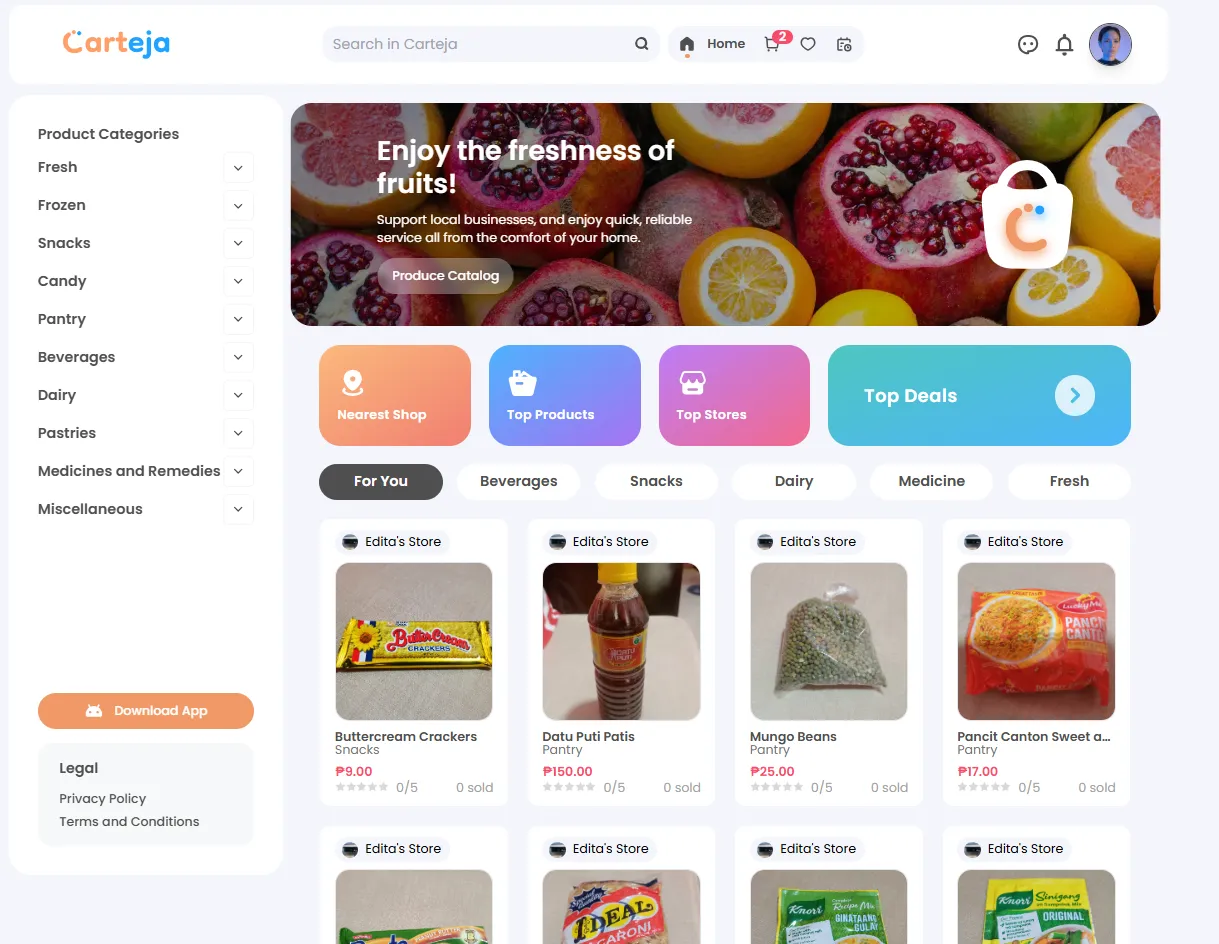
Carteja offers multiple ways to discover and explore products from local sari-sari stores. Whether you’re looking for something specific or just browsing for inspiration, our platform makes it easy to find what you need.
📂 Category Sidebar
Left sidebar navigation - Organized by product type
Browse through carefully organized categories like Fresh, Frozen, Snacks, Beverages, and more. Each category can be expanded to show subcategories.
🏷️ Category Tabs
Quick category switching - Located below Quick Access
Switch between For You, Beverages, Snacks, Dairy, Medicine, and Fresh tabs for instant category filtering.
🔍 Search Function
Keyword-based discovery - Find specific products instantly
Type product names, brands, or descriptions in the top search bar for immediate results across all stores.
⚡ Quick Access
Specialized browsing - Curated product collections
Use Nearest Shop, Top Products, Top Stores, and Top Deals cards for targeted product discovery.
The left sidebar provides the most comprehensive way to browse products by type:
Select a Category
Click on any main category (Fresh, Frozen, Snacks, Candy, Pantry, Beverages, Dairy, Pastries, Medicines and Remedies, or Miscellaneous)
The main product area will immediately update to show items from your selected category
Explore Subcategories
Look for dropdown arrows next to category names
Click to expand or collapse subcategories for more specific browsing
Use subcategories to narrow down your search within broader categories
Browse Results
Scroll through the filtered product grid
All displayed products will be from your selected category
Switch between categories anytime to explore different product types
Below the Quick Access section, you’ll find convenient category tabs for rapid browsing:
For You - Personalized product recommendations based on your browsing history and preferencesBeverages - Drinks, juices, water, and other liquid refreshmentsSnacks - Chips, crackers, and quick bite optionsDairy - Milk, cheese, yogurt, and dairy productsMedicine - Health and wellness productsFresh - Fresh produce and perishable items
Simply click on any tab to instantly view products from that category.
Each product is displayed as an informative card containing key details:
📸 Visual Information
Product Image - Clear photo of the actual itemProduct Name - Descriptive title (e.g., “Crispy Patata,” “Tortitos”)Visual quality indicators - Condition and freshness cues 📋 Essential Details
Store Name - Which local store is selling the itemPrice - Cost in Philippine Peso (₱25.00, ₱30.00, etc.)Availability status - In stock or out of stock indicators
Click Product Card
Click anywhere on the product card you’re interested in
This opens a comprehensive detailed view
Explore Details
View expanded product descriptions
See additional product images if available
Check detailed pricing and store information
Make Purchase Decision
Review all product information
Access purchasing options directly from the detail view
Add items to cart or proceed to checkout
Detailed product views provide comprehensive information to help you make informed purchasing decisions, including
ingredients, sizes, and store-specific details.
For quick and targeted product discovery:
Access Search Bar
Locate the search bar at the top of the page
Click inside the search field
Enter Keywords
Type product names, brands, or descriptions
Use specific terms for better results (e.g., “instant coffee” vs. “coffee”)
View Results
Press Enter or click the search icon
Browse through comprehensive search results
Results show products from all participating stores
Use specific product names for exact matches
Try brand names for specific products
Use general terms (like “snacks”) for broader results
Include Filipino product names for local items
Use these specialized browsing features for targeted product discovery:
🏪 Nearest Shop
Location-based browsing
Find products from stores closest to your location. Perfect when you want faster delivery or to support nearby businesses.
⭐ Top Products
Popular items (Coming Soon)
Browse the most popular items across all stores. See what other customers are buying most frequently.
🏆 Top Stores
Highly-rated shops (Coming Soon)
Explore products from stores with the highest customer ratings and best reviews.
💰 Top Deals
Special offers (Coming Soon)
Discover discounted products and special promotional offers from participating stores.
Start with “For You” - Check personalized recommendations firstUse categories - Browse by product type when you know what you needTry search - Use keywords when looking for specific itemsCheck Nearest Shop - Find products with faster delivery times
💡 Compare Options
Multiple stores - Same products from different shopsPrice comparison - Find the best deals availableStore ratings - Choose from trusted sellersDelivery distance - Consider delivery time and cost 🎯 Optimize Experience
Save favorites - Bookmark products you buy regularlyCheck availability - Verify stock before orderingRead descriptions - Understand product details fullyConsider bundling - Add multiple items from same store 🆘 Common Issues
Email verification not received
Password requirements not met
Phone number format errors
Address validation problems
Troubleshooting Guide →
💬 Get Support
Still need help? Our support team is ready to assist you:
Contact Support →