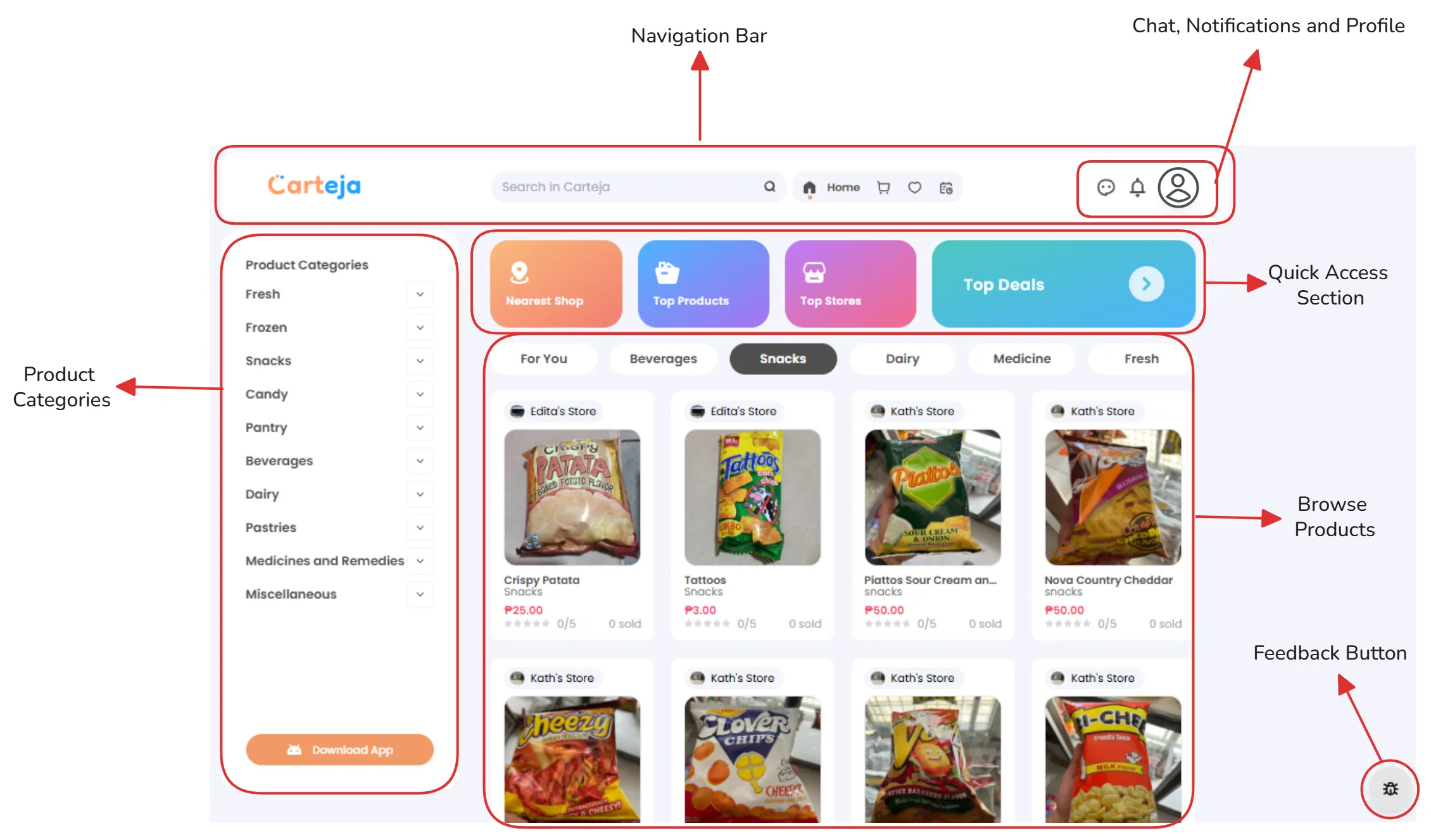
The Carteja Web Platform is designed to make shopping from local sari-sari stores simple and intuitive. Every element is strategically placed to help you find and purchase products with ease.
🔍 Navigation Bar
Located at the top - Your command center for the entire platform
Carteja Logo - Click to return to homepage anytimeSearch Bar - Type keywords to find specific products instantlyQuick Icons - Home, Cart, and Favorites for rapid navigation 👤 User Controls
Top-right corner - Account and communication tools
💬 Chat Support - Chat with your favorite stores🔔 Notifications - Stay updated on orders and offers📱 Profile Menu - Access account settings and order history 📂 Product Categories
Left sidebar - Browse products by type
Fresh & Frozen - Perishable items from local storesSnacks & Beverages - Quick treats and drinksPantry Essentials - Cooking ingredients and household itemsHealth & Medicine - Pharmacy and wellness products ⚡ Quick Access
Main dashboard cards - Shortcuts to popular sections
🏪 Nearest Shop - Find stores closest to you⭐ Top Products - Most popular items in your area🏆 Top Stores - Highest-rated local shops💰 Top Deals - Best discounts and promotions
Use the category tabs (For You, Beverages, Snacks, etc.) to quickly filter products by type. The “For You” tab
shows personalized recommendations based on your shopping history!
The main content area is where the magic happens:
For You - Personalized product recommendationsBeverages - Drinks, juices, and refreshmentsSnacks - Chips, crackers, and quick bitesFresh - Fruits, vegetables, and perishablesFrozen - Ice cream, frozen meals, and more
Each product card displays:
High-quality images of the actual productsProduct names and descriptionsCurrent prices with any discounts highlightedStore information showing which local shop has the itemAdd to Cart buttons for quick purchasing
🟢 Availability Indicators
Green badges - In stock and ready for deliveryStore names - Know exactly which shop you’re buying fromDistance markers - See how far the store is from you 💡 Smart Features
Price comparisons - See prices across different storesDelivery estimates - Know when your order will arriveStock levels - Real-time inventory updates The web interface automatically adapts to your screen size:
Desktop - Full sidebar navigation and expanded product gridTablet - Collapsible sidebar with touch-optimized controlsMobile - Streamlined interface with bottom navigation bar
Start with “For You” - Check personalized recommendationsUse the search - Type specific products you needBrowse categories - Explore what’s available in your areaCheck “Nearest Shop” - Find the closest stores to you
⚡ Keyboard Shortcuts
Ctrl + K - Quick searchCtrl + H - Return to homepageCtrl + M - Open main menuEsc - Close any open modals 🎯 Advanced Filters
Price ranges - Set your budget limitsStore ratings - Shop only from top-rated storesDelivery time - Filter by how quickly you need itemsProduct categories - Combine multiple filters 🆘 Common Issues
Email verification not received
Password requirements not met
Phone number format errors
Address validation problems
Troubleshooting Guide →
💬 Get Support
Still need help? Our support team is ready to assist you:
Contact Support →