
Skip to content

Scheduling Orders

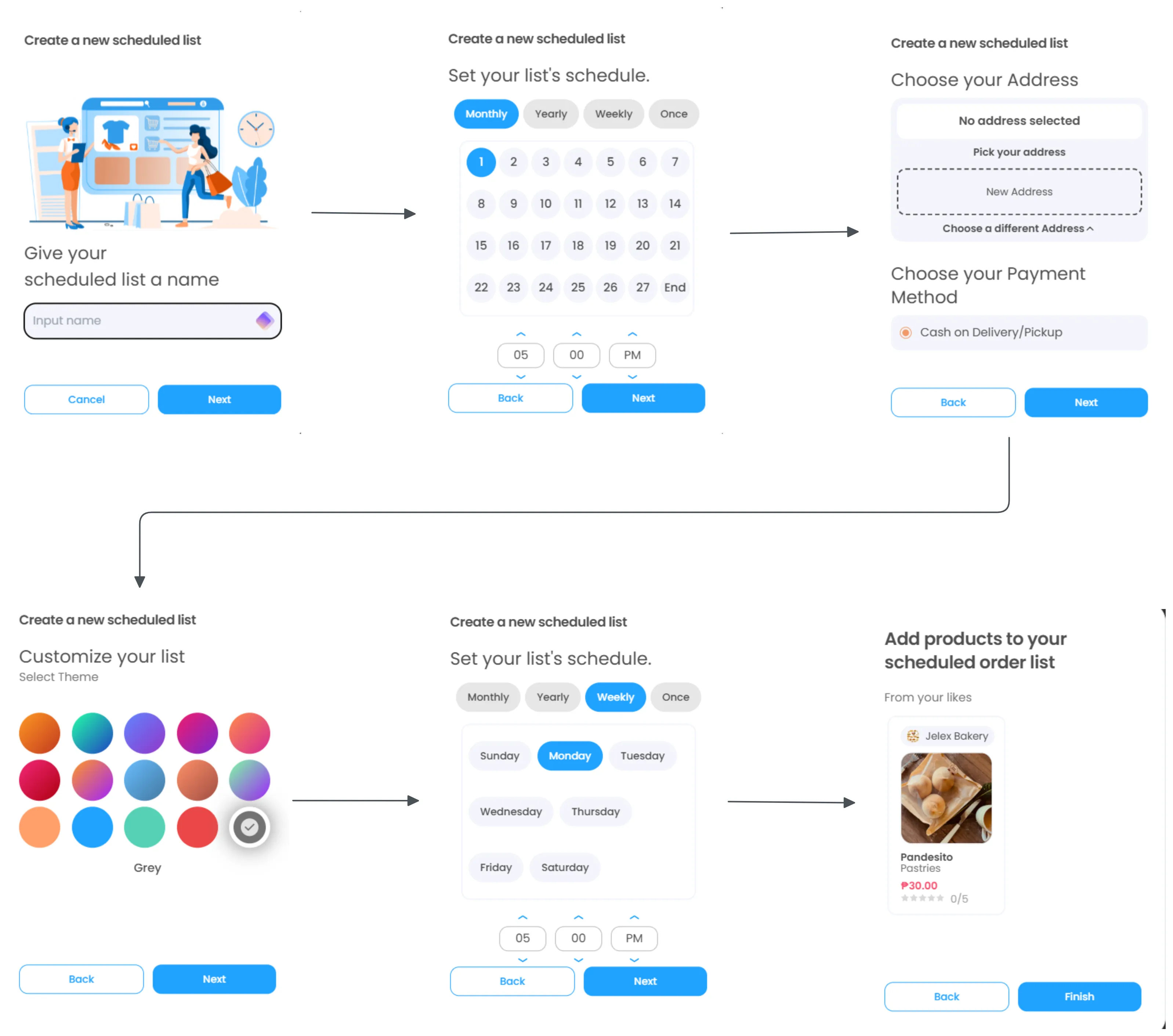
The Scheduler feature allows you to plan your purchases in advance and set up automatic recurring orders.
Scheduler

  1. Access Scheduler

    • Click “Scheduler” in the top navigation bar
    • Select “Create a new scheduled list”
  2. Customize Your List

    • Choose a theme color for your list from the available color palette
    • Click “Next” to continue
  3. Set Delivery Details

    • Choose Your Address:
      • Select “New Address” to add a delivery location
      • Or “Choose a different Address” if you have saved addresses
    • Choose Payment Method:
      • Currently available: “Cash on Delivery/Pickup”
    • Click “Next” to proceed
  4. Name Your List

    • Enter a descriptive name for your scheduled list
    • Examples: “Weekly Groceries,” “Monthly Essentials”
    • Click “Next” to continue
  5. Set Your Schedule

    • Frequency Options:
      • Monthly: Repeats every month
      • Yearly: Repeats annually
      • Weekly: Repeats every week
      • Once: One-time scheduled order
    • Day Selection:
      • Choose specific days of the week (Sunday through Saturday)
      • Multiple days can be selected
    • Time Selection:
      • Set hour and minutes
      • Choose AM/PM
    • Click “Next” to finalize schedule settings
  1. Navigate to any product detail page 2. Locate the “Schedule Button” between the Buy Now and Like buttons 3. Click + Add new list or select an existing scheduled list 4. The product will be added to your recurring order

Automatic Processing

Orders are placed automatically at your specified times using your saved address and payment method.

Flexible Frequency

Choose from weekly, monthly, yearly, or one-time scheduling options.

Easy Modifications

Modify or cancel your scheduled lists anytime through the Scheduler section.

Saved Preferences

Your delivery address and payment method are automatically saved for each scheduled list.

🆘 Common Issues

  • Email verification not received
  • Password requirements not met
  • Phone number format errors
  • Address validation problems

Troubleshooting Guide →