
Back to Buyer Mode
Lets the seller switch back to the regular buyer interface.
The Carteja Seller Mobile Interface is built for speed, simplicity, and daily convenience. Sellers can seamlessly manage their shops, products, and notifications from a mobile-friendly dashboard designed for ease of use.
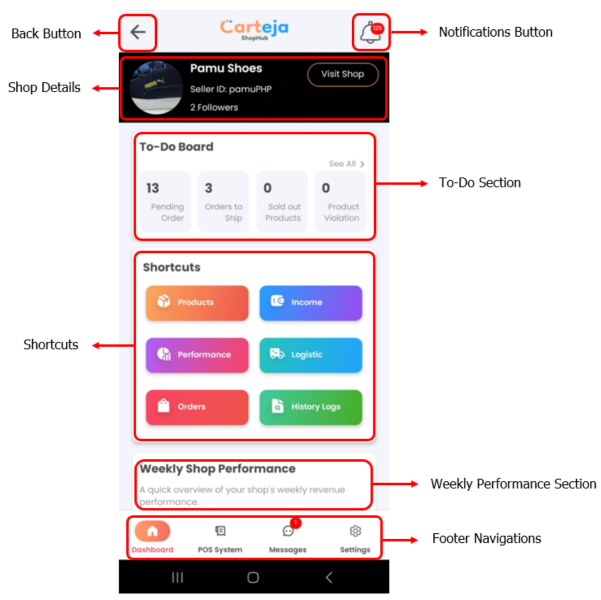
The Top Bar is located at the top of the seller interface. It provides access to important navigation buttons:
Back to Buyer Mode
Lets the seller switch back to the regular buyer interface.
Notifications
Shows alerts related to orders and important seller updates.
The Shop Details section displays key information about the seller’s shop:
Shop Profile
Sellers can update shop name, display photo, address, pickup availability, and active status.
Followers
Displays the total number of buyers who follow the shop.
Visit Shop
Opens the shop’s public page for buyers to browse available products.
The To-Do Board Section provides the seller with a quick overview of current order statuses.
Displays quick data such as:
See All – Opens the full Order Management page for a detailed view and action handling.
Pending Orders
These are orders that have been placed but not yet packed. Tap to begin preparation.
Orders to Ship
Packed orders awaiting pickup or handoff to your delivery provider.
Sold Out Products
Items that are out of stock and hidden from buyers until replenished.
Product Violations
Listings flagged for policy violations. Review and take corrective action.
The Shortcuts Section offers quick access to essential seller tools for managing the shop efficiently:
Products
Manage and organize items listed in your shop, including prices and stock.
Performance
View visual reports on sales, revenue, and shop followers to evaluate progress.
Orders
Track and fulfill customer purchases from confirmation to delivery.
History Logs
Review past updates and changes to products or orders for accountability.
Stay on top of your store’s growth by reviewing sales trends in real time. This section presents a visual summary of your shop’s performance over the current week.
The Footer Navigation Section offers quick access to the core areas of the seller interface. Located at the bottom of the screen, it helps sellers seamlessly switch between key pages essential to daily operations:
Dashboard
Your go-to page for daily shop metrics, alerts, and overall store health.
POS System
Use the built-in Point-of-Sale tool for in-store transactions and real-time inventory updates.
Messages
Respond to buyer queries instantly through the in-app messaging system.
Settings
Edit shop information, update policies, and manage your Admin PIN.
Common Issues
Get Support
Still need help? Our support team is ready to assist you: