
Skip to content

POS (Point of Sale) System

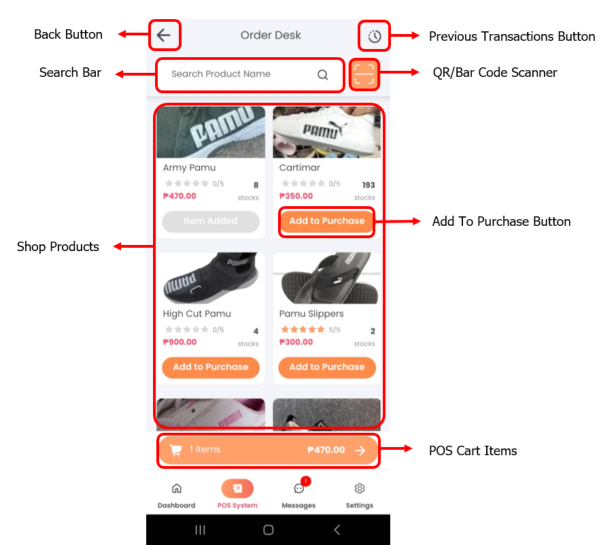
The POS (Point of Sale) System is designed for processing in-store purchases. It allows sellers to:
  • Track real-time inventory
  • Log transactions made within the physical shop
  • Maintain a clear transaction history
Carteja Mobile POS Page

Used when a customer is purchasing directly from the store.

    • Tap POS System from the menu.
    • Select the product(s) ordered by the customer.
    • Tap the Cart icon.
    • Input your Admin PIN to proceed.
    • Tap Checkout and provide customer details:
      • Discount (if applicable)
      • Amount Paid by the customer
    • Tap Confirm Purchase to complete the transaction.

Used to correct or adjust a previously logged in-store transaction.

    • After completing a transaction, tap Edit Transaction,
      or
    • Navigate to the POS System page and select a previous transaction from the list (upper left).
    • Modify the following as needed:
      • Product
      • Discount (if applicable)
      • Amount Paid by the customer
    • Tap Edit Purchase.
    • Input your Admin PIN to save changes.

Common Issues

  • Transaction not saving after checkout
  • Edited details not updating correctly
  • Admin PIN not being accepted
  • Cart items not appearing during checkout

Troubleshooting Guide →