
Common Issues
- Shop performance data not loading
- To-Do section showing incorrect counts
- Notifications not appearing in real-time
- Cannot switch between shop and buyer view
The Carteja Seller Web Platform is where sellers manage their shop online. This guide explains the main sections of the Shop Dashboard.
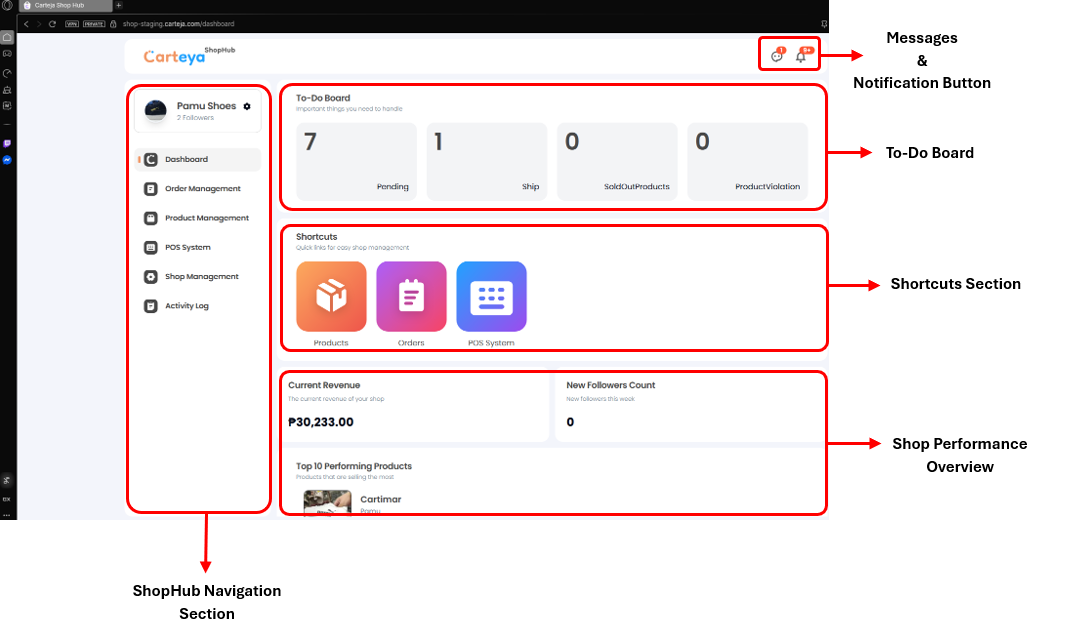
The Shop Navigation Links allow sellers to access shop features and switch between Shop View and Buyer View.
Shop/Buyer Switch
Click the settings icon beside the shop name to view your shop or switch to the buyer side.
Accessible Pages on Shop Side:
The To-Do Board Section gives sellers a quick view of pending tasks that need attention.
This feature keeps sellers updated with important events and allows communication with buyers.
The Shortcuts Section provides one-click access to frequently used pages.
This section provides an overview of shop sales and analytics.
Common Issues
Get Support
Still need help? Our support team is ready to assist you: