The Point-of-Sale (POS) System enables sellers to handle in-store transactions, manage inventory updates, and generate real-time sales records.
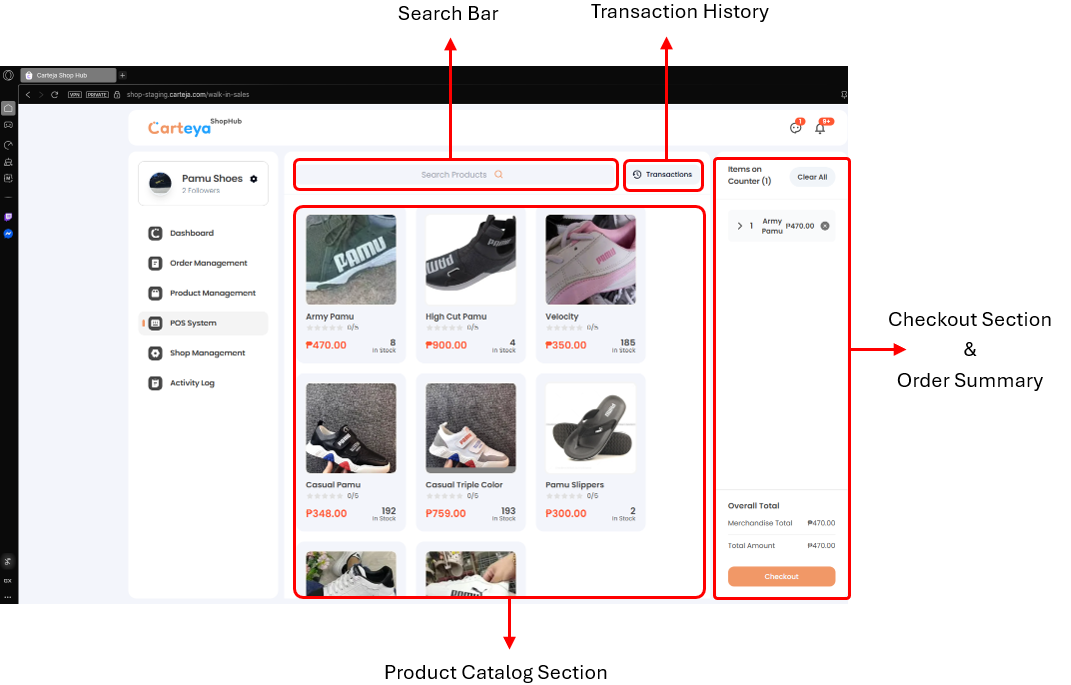
Quickly locate products in your inventory.
-
- Go to the POS page in your Carteja ShopHub dashboard.
-
- Search by product name using the search bar.
- Filter by category if necessary.
- Use product codes or SKUs for faster results.
Build customer orders for checkout.
-
- Search for the products you want to add.
-
- Select the products to include in the transaction.
-
- Modify the number of items as needed.
-
- Verify all details before proceeding to checkout.
Finalize the sale by selecting payment options, applying discounts, and confirming the purchase.
-
- Review the order details on the checkout screen.
-
- Select from cash, digital payments, or other available options.
-
- Add promos or special offers if applicable.
-
- Tap Confirm Purchase to complete the transaction and generate a receipt.
Make corrections to completed sales such as price changes, quantity adjustments, or payment updates.
-
- Search and select the past transaction you want to edit.
-
- Enter the Admin PIN to access the transaction editor.
-
- Adjust pricing, quantities, or payment method as needed.
-
- Enter the Admin PIN again to confirm and save changes.
Common Issues
- Products not showing in search
- Transactions not saving after checkout
- Admin PIN not being accepted
- Edited changes not updating
Troubleshooting Guide →
Get Support
Still need help? Our support team is ready to assist you:
Contact Support →